MCP server
What for?
Since the version 0.9.13, Malcat comes with two MCP servers:
a headless MCP server that allows you to run new analyses directly from your LLM client (for paid users only, since it requires the headless lib)
a GUI-only MCP server that connects a running Malcat instance to a LLM. You’ll be able to inspect the current analysis and edit/rename stuff (all users)
We think that Malcat + a good LLM like Claude make a great combo for malware triage. Indeed, when it comes to LLM-assisted triage, Malcat offers several unique features:
It’s fast: don’t wait minutes for the analysis. Which is good, because LLMs are slow enough as it is
a single tool to rule them all: Malcat can handle most of what is thrown at it like installers, archives, documents but also most architectures. No need to install dozens of external tools and reanalyse the same file again and again!
Malcat’s numerous signatures, such as anomalies, constants or Yara rules, help the LLM to get faster to the point.
Kesakode function labeling allow the LLM focus on unique code and strings instead of known clean/library functions
In practice, we’ve found the Malcat+Claude combo to be pretty efficient at triaging. It of course depends on the sample at the end, but a simple triage summary is usually done in less than a minute, sometimes up to 5 minutes for complex chains (like installer to dropper to py2exe to …).
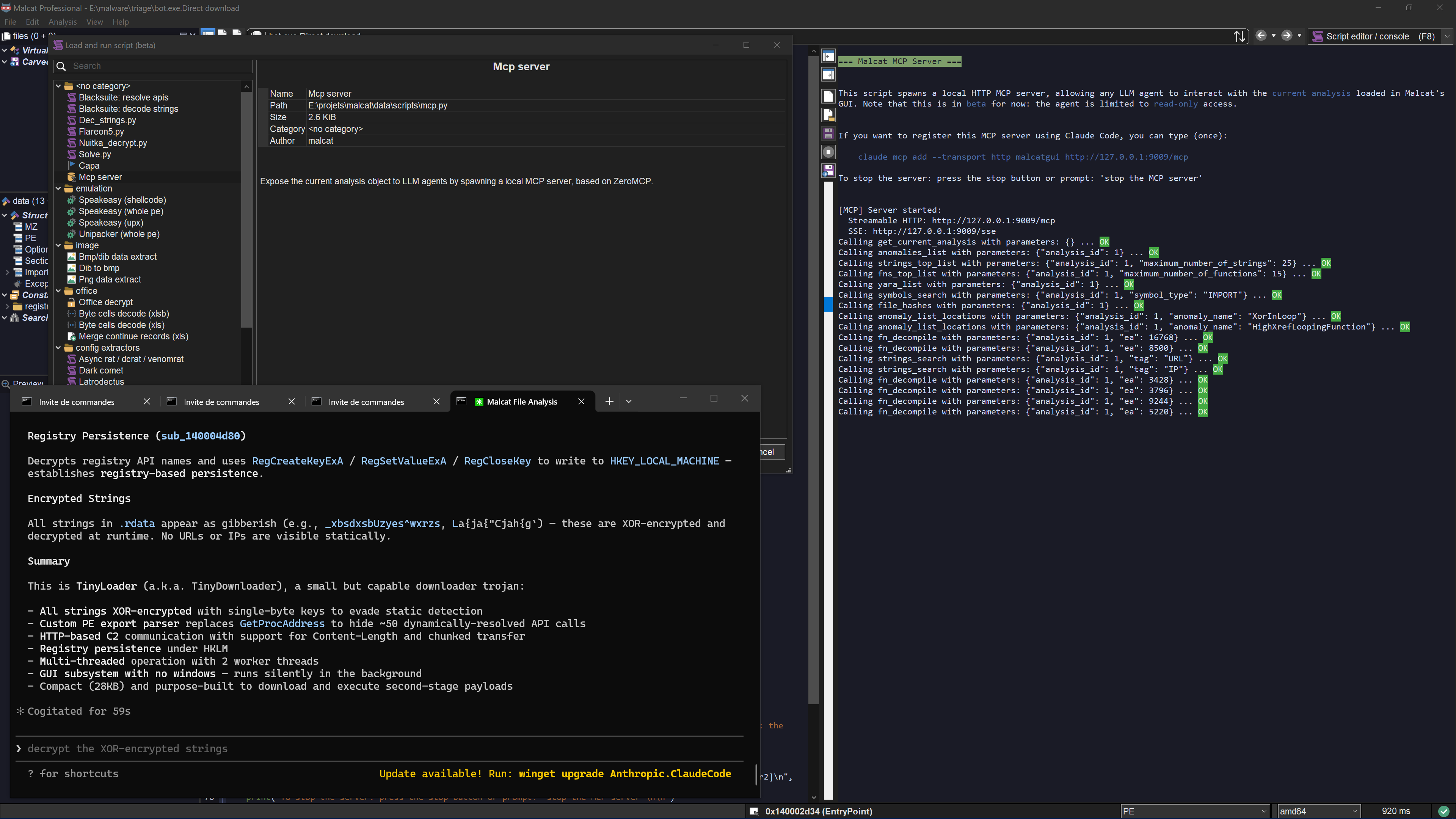
Malcat in-GUI MCP server
You can also use Malcat+Claude for more advanced tasks, such as statically unpacking a stub, or even pure reverse engineering. But in my experience the LLM requires much more time, tokens and guidance for such scenarios (at least for complex samples).
Headless MCP server
If you own a paid Malcat version, you can already Run Malcat from your python interpreter. In 0.9.13, we have added a MCP server in <malcat install dir>/bin/malcat.mcp.py. If you want to use it directly from Claude code, you can register it once using the following command:
claude mcp add --transport stdio [--scope user] malcat -- python <malcat install dir>/bin/malcat.mcp.py
And … that’s it! By registering Malcat’s MCP server using the stdio protocol, Claude code will automatically start it when needed. Note that for this to work, you need to make sure that you use the same python interpreter as your Malcat installation (see Run Malcat from your python interpreter). If you have a more complex setup, you can also manually start the server in http mode:
python <malcat install dir>/bin/malcat.mcp.py -p 9009
and then connect Claude to the http server:
claude mcp add --transport http [--scope user] malcat http://127.0.0.1:9009/mcp
So what can you (and your LLM) do with this headless MCP server?
Analyse a new file on disk (metadata, regions layout, entropy)
Analyse sub-files (carved files, virtual files) or arbitrary file intervals
Save file intervals, carved files or virtual files to disk
List and inspect anomalies, constants, Yara rules
List the most interesting functions and strings (using Malcat’s heuristics + kesakode)
Search functions, symbols or strings following criterion
Disassemble and decompile functions (for all supported architectures)
Decompile scripts (VBA, autoit, MSI tables, excel macros, etc.)
Navigate though cross references and function callees/callers
List and apply a chain of Malcat’s transforms (nice for static unpacking)
Convert addresses (offset, virtual address, effective addresses)
Warning
Unless you own an OEM license, offline Kesakode results are not available in headless mode, and thus to the headless MCP server. If you still want to take advantage of Kesakode (and you should), you will need to start the headless MCP with an additional -k <malcat license key> option. This will tell the MCP server to perform an online kesakode lookup for every new analysis.
You will notice that we haven’t exported the full Malcat API there. When the MCP server has been designed, we have put our focus on:
Simplicity: we have limited the number of tools exposed (45 tools currently) in order to not eat up your precious context window (<6k context eaten right now). In the same vein, there is no tool to list all functions or all strings. You can only list the X most interesting ones (thank you Kesakode) or search for a given pattern. This also helps tremendously with context overflows.
Security: there are enough tools that your LLM doesn’t need any python. For instance by interfacing with Malcat transforms, your agent can decrypt most payloads without the need to run custom scripts. I don’t like letting LLMs run crafted code.
GUI MCP server
Using the GUI MCP server is even easier. You start the server using either the menu (Analysis > Run MCP server), the script-launcher (Mcp asistant) or using the shortcut Ctrl+M. The server will run in the script editor. You can stop it at any time using the stop button.
On Claude’s side, you need to register the MCP server once using the following command:
claude mcp add --transport http [--scope user] malcatgui http://127.0.0.1:9009/mcp
Once this is done, you can just type your prompt in claude code. The GUI MCP server adds a couple of features on top of the headless server:
You can follow the LLM: locations inspected by the LLM are show in real time in the GUI, and tool calls are displayed in the script output windows
The LLM can see what you are looking at. E.g., ask him to explain the current function
You can rename functions and variables for a function. In the GUI, you’ll be able to see the changes immediately and undo/redo them.
You can select things, for instance ask it to select for you the C2 address of a malware.
You can ask him to open a new file (e.g. an unpacked payload) in the GUI. This will stop the current MCP session though, since you can’t open a new file in the GUI while a script is running.
Note
While the GUI MCP server is totally capable of juggling between several files (e.g. for static unpacking sessions), it’s better suited to inspect the current analysis (because the MCP server and the analyses are both competing for the python’s GIL). If you need to inspect complete infection chains, use the headless server instead.
Include it in your pipeline
Note that both the full and pro licenses of Malcat are named licenses, meaning you can only use Malcat to inspect your own files (cf. Legal restrictions when using the python module). If you want to include a headless Malcat + headless MCP server duet in a company pipeline, you will need an OEM license. The OEM license also gives you access to offline Kesakode results. You can Contact us for more information.